How to set a reminder on a note in Notes for Android
Attach a reminder to any note so it comes back to you when you need it.
A note is only useful if you see it at the right time. A reminder brings it back.
Steps
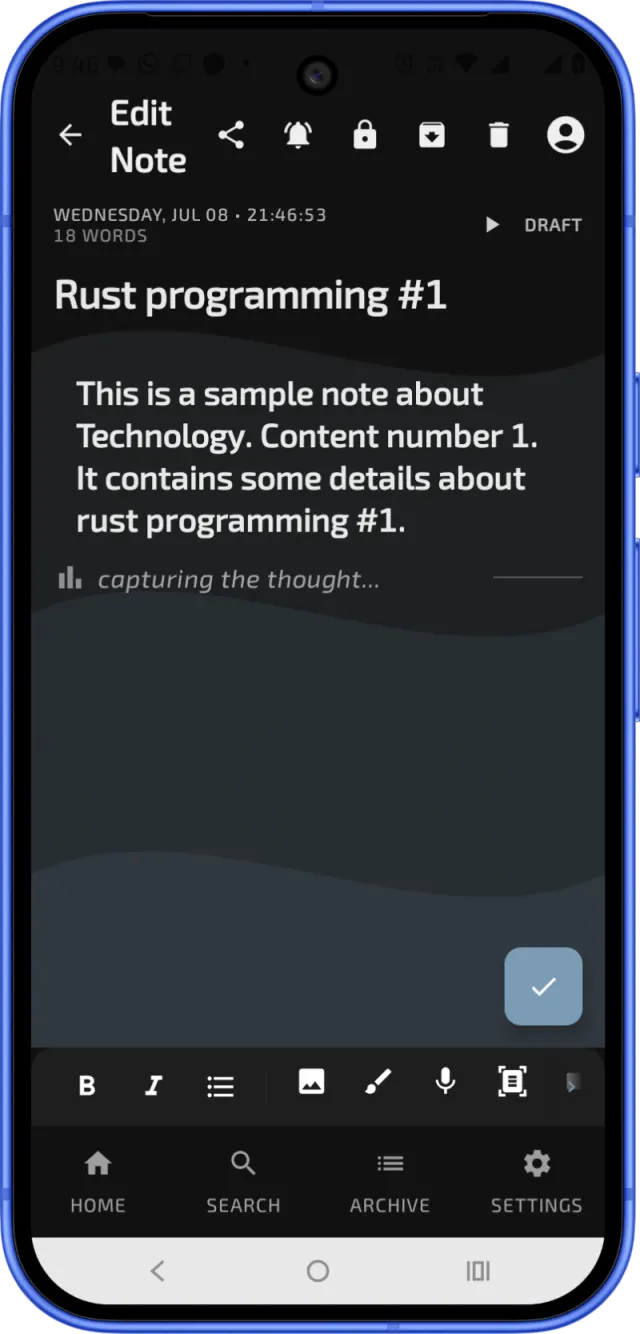
- Open the note, or create a new one.
- Tap the Reminder icon (the bell) in the top bar, between Share and Lock.
- Choose when you want to be reminded.
- Tap Save.
If Android asks to let Notes send notifications, allow it. Without that permission, a reminder cannot reach you.
Show times your way
Open Settings and find Time Format. Turn the 12-hour option on or off to choose how times appear on notes and reminders.
Tips
- Put the action in the title, such as "Call the electrician", so the reminder tells you what to do.
- Pair a reminder with a folder like Work or Personal so it is easy to find afterwards.